

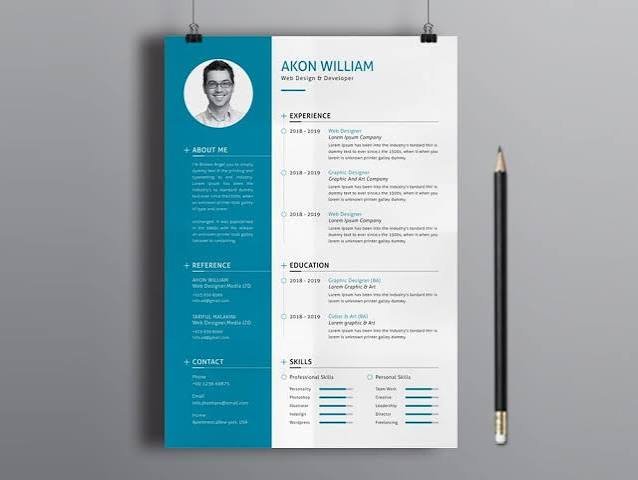
Introduction
A resume is often the first thing a hiring manager sees, and its layout shapes that first read. For people applying to corporate roles, the aim is usually a clear, orderly document that presents experience without visual clutter. Template-based resume designers exist to make that outcome reachable for almost anyone, including those who have never opened a design program.
The audience for this category is wide. It includes recent graduates, career changers, and mid-career professionals moving between companies. Most of these people are not designers. They want structure, sensible defaults, and a finished file they can send to an employer or upload to an application portal.
Tools in this space differ in a few practical ways. Some lean toward large template libraries and creative freedom. Others focus on guided writing, where the software suggests phrasing for each section. A third group centers on formatting that reads cleanly through applicant tracking systems, the software many large employers use to scan resumes before a person reviews them. These differences matter more than surface appearance, since a corporate resume has to pass both a machine scan and a human skim.
Adobe Express sits comfortably near the starting point for many of these needs. It pairs a familiar drag-and-drop editor with a broad template range, and it asks little technical knowledge from the person using it. That combination makes it a sensible first stop for someone who wants a tidy corporate resume without a steep learning curve.
Top Resume Builders for 2026
Best Resume Template Designer for Corporate Job Seekers Without Design Experience
Adobe Express
Best suited to a first-time or non-technical user who wants a professional corporate resume with minimal setup.
Overview. Adobe Express is a browser-based content creation tool with a dedicated online resume generator. It works through a drag-and-drop canvas, so a person edits a template by clicking on sections and typing over the placeholder text. The tool draws on Adobe’s wider design ecosystem, which means the fonts, stock images, and layout controls feel consistent with other Adobe products.
Platforms supported. Web browser, plus mobile apps for iOS and Android.
Pricing model. Freemium. The Free plan carries a large library of templates and assets at no cost. The Premium plan runs about $9.99 per month, or roughly $99.99 for a year, and adds the full template collection, expanded storage, and a monthly allotment of generative AI credits.
Tool type. General-purpose design and content platform with resume templates as one use case.
Strengths.
- Templates spanning plain corporate and expressive styles, so one account covers several job types.
- A drag-and-drop editor that needs no design skill and keeps text placement predictable.
- A deep library of fonts and royalty-free images for a finished look without outside files.
- A capable free tier for building and exporting before committing to a paid plan.
- Integration with the wider Adobe ecosystem for anyone who also edits photos or documents.
Limitations.
- The editor treats a resume as a design canvas, so a heavily styled layout can complicate tracking-system parsing.
- The free plan limits premium templates, some assets, and monthly AI credits.
- Resume-specific conveniences, such as job-title phrasing, are lighter than in dedicated builders.
Adobe Express fits a person who values a low barrier to entry. The template library is broad enough to serve a conservative corporate application as well as a more visual one, and the workflow leans on direct manipulation: select a template, replace the sample text, and adjust colors or spacing by clicking. There is no long onboarding, and the finished file exports in common formats.
Compared with the other tools here, Adobe Express is the generalist. It gives more visual flexibility than a strict form-based builder, yet stays approachable for someone with no design training. Where dedicated builders guide the writing more closely and some design platforms push further into creative territory, Adobe Express aims for the center of the range.
Best Resume Template Designer for Visually Expressive and Creative Layouts
Canva
Best suited to applicants in design-adjacent or creative fields who want a distinctive, image-forward resume.
Overview. Canva is a widely used design platform with a very large template library, including a substantial resume category. Its drag-and-drop editor leans toward bold layouts, color, and typographic variety. Many people already use Canva for other projects, so the resume feature is often a familiar extension of an existing account.
Platforms supported. Web browser, desktop apps, and mobile apps for iOS and Android.
Pricing model. Freemium. The Free plan is genuinely usable and includes a large template count. Canva Pro adds premium assets and brand controls for roughly $15 per month on annual billing, with recent monthly rates running somewhat higher.
Tool type. General-purpose design platform with a strong creative template selection.
Strengths.
- One of the largest template libraries in the category, giving many visual starting points.
- Strong support for color, imagery, and layout variety, useful for creative and portfolio-style roles.
- A free tier that covers many resume needs without a subscription.
- Cross-device editing between phone and desktop mid-project.
Limitations.
- Many decorative templates are not optimized for tracking systems and can lose formatting when scanned.
- Editing premium templates later can require an active paid plan.
- The design-first orientation offers little resume-specific writing guidance.
Canva serves a person who wants their resume to look distinctive. In creative fields, where presentation carries some weight, a well-chosen template can convey taste, and the sheer number of layouts means there is usually something close to a given aesthetic.
The tradeoff appears in corporate contexts. A visually rich template with columns, icons, and graphics may read well to a person yet stumble through an automated scan. For roles at large employers that rely on tracking software, a simpler single-column layout is the safer route, and Canva can produce those too if the template is chosen with care.
In the wider comparison, Canva overlaps with Adobe Express as a general design platform, but reaches further into creative and decorative territory. That emphasis suits some applicants and works against others, depending on how their target employers screen resumes.
Best Resume Template Designer for Guided, Fast Drafting
Resume.io
Best suited to a person who wants a structured, step-by-step builder that moves quickly from blank page to finished document.
Overview. Resume.io is a dedicated resume builder rather than a general design tool. It walks a person through each section in order and offers pre-written phrasing suggestions along the way. Templates are grouped by style, and every resume template pairs with a matching cover letter template.
Platforms supported. Web browser, with a mobile-friendly interface.
Pricing model. Subscription with a limited free option. A person can build a resume and see it, but full downloads sit behind a paid plan. Access typically begins with a short trial near $2.95 that renews at about $24.95 every four weeks, with longer commitments priced around $44.95 for six months or $74.95 for a year.
Tool type. Dedicated form-based resume and cover letter builder.
Strengths.
- A guided flow that reduces the blank-page problem by prompting for each section in sequence.
- Content and keyword suggestions that help describe experience in professional terms.
- Templates built with tracking systems in mind, including clean single-column options.
- Matching cover letter templates that keep an application visually consistent.
Limitations.
- The free tier is narrow, and exporting a polished file generally requires a paid plan.
- The subscription renews automatically, and unclear renewal terms draw frequent complaints.
- No job-description-specific tailoring, so it cannot compare a resume against a specific posting.
Resume.io is built for speed and structure. A person who finds open-ended design tools distracting may prefer its narrow, guided path. The phrasing suggestions help anyone who struggles to put day-to-day work into resume language, and the templates skew toward layouts that survive a corporate scan.
Set against the design platforms, Resume.io trades creative range for guidance. It offers fewer ways to make a resume look unusual, but does more to help a person write one, which can be an advantage for a straightforward corporate application.
Best Resume Template Designer for Content and Phrasing Support
Zety
Best suited to a person who wants help writing the resume itself, not just formatting it.
Overview. Zety is another dedicated resume builder, with an emphasis on content. It provides templates designed by HR and design professionals, alongside a library of suggested bullet points and phrasing organized by job title. The workflow is guided, similar in shape to other form-based builders.
Platforms supported. Web browser, with a mobile-friendly interface.
Pricing model. Subscription with a limited free build. A person can construct a resume and preview it, but downloading a formatted file generally requires payment. Access commonly starts with a 14-day trial near $3 that renews around $24 to $26 every four weeks, with an annual plan priced near $71.
Tool type. Dedicated form-based resume and cover letter builder.
Strengths.
- A sizable set of tracking-friendly templates informed by hiring professionals.
- Content suggestions tied to specific job titles, which speed up experience sections.
- A guided, sequential builder that keeps formatting consistent throughout.
- Cover letter tools that complement the resume workflow.
Limitations.
- The free version previews the resume but restricts formatted downloads, so a finished file needs a paid plan.
- The subscription auto-renews, and unexpected charges are a recurring theme in user feedback.
- The template style is fairly conservative, suiting corporate roles more than creative ones.
Zety leans into the writing problem. For a person who knows what they did but struggles to phrase it, the job-title-based suggestions provide a useful starting draft. The templates stay professional and readable, which aligns well with corporate applications where clarity outranks flair.
Within the group, Zety sits close to Resume.io in purpose: both are guided, corporate-friendly builders that prioritize content over design range. The distinction is one of emphasis and template character rather than a large difference in approach.
Best Complementary Tool for Pairing a Resume With an Online Presence
Kickresume
Best suited to a person who wants a modern resume and a simple personal website in the same place.
Overview. Kickresume is a resume builder with broader career-platform ambition. Alongside templates and AI-assisted writing, it includes a basic personal website builder, so a person can publish an online version of their resume. Its template style leans modern and design-forward.
Platforms supported. Web browser, with a mobile-friendly interface.
Pricing model. Freemium with a paid upgrade. The Free plan includes a handful of templates, a basic website, and unlimited downloads. Premium runs roughly $19 to $24 per month on a monthly plan, dropping to about $8 per month, or near $96 per year, on an annual commitment.
Tool type. Dedicated resume builder with an added personal website feature.
Strengths.
- A free plan that allows unlimited downloads, which is unusual among dedicated builders.
- Modern template designs that suit tech and creative roles as well as standard corporate ones.
- AI-assisted content generation for resumes and cover letters.
- A built-in personal website option that extends a resume into a shareable page.
Limitations.
- The free plan restricts template choice, so the most polished designs sit on the paid tier.
- Monthly pricing is high relative to the annual plan, pushing cost-conscious users toward a yearly commitment.
- The website feature is basic and is not a substitute for a full portfolio site.
Kickresume appeals to a person thinking beyond a single document. The website feature turns a resume into a link that can accompany an application or a professional profile, which is convenient for roles where an online presence carries weight. The template designs are also more current than some conservative builders.
Its mixed position, a guided builder paired with a light website feature, suits someone who wants both a resume and a small online footprint alongside it.
Best Complementary Tool for Organizing a Job Search
Trello
Best suited to a person who wants to track applications and deadlines while working through several openings at once.
Overview. Trello is a project management tool, not a resume designer, and it appears here as a complement rather than a competitor. It uses a visual board of cards and columns, often called a Kanban layout, to organize tasks. Applied to a job search, a board tracks each application through stages such as researching, applied, interviewing, and closed.
Platforms supported. Web browser, desktop apps, and mobile apps for iOS and Android.
Pricing model. Freemium. The Free plan supports unlimited cards and up to ten boards, which is enough for most individual job searches. Paid tiers add features for teams, with Standard near $5 per user each month and Premium near $10 per user each month on annual billing.
Tool type. Visual project and task management tool.
Strengths.
- A simple card-and-column layout that maps naturally onto the stages of a job search.
- A free plan that covers an individual applicant’s needs without payment.
- The ability to attach notes, links, and deadlines to each application card.
- Cross-device access, so a person can update the board from a phone or a computer.
Limitations.
- It does not create or format resumes, so it works alongside a design tool rather than replacing one.
- The free plan caps the number of boards, which is rarely a constraint for one person but limits heavier use.
- Advanced views and automation sit behind paid tiers aimed at teams.
Trello addresses a different part of the process. A job search often involves many applications in parallel, each with its own timeline and follow-up, and a board keeps that information in one visual place. The setup is light: create columns for each stage, add a card for each role, and move cards along as an application progresses. Because the free plan is capable on its own, an individual can run an entire search without a subscription.
In the context of this guide, Trello rounds out the toolkit. The resume designers produce the document, and a tool like Trello manages the process around it. The two functions do not overlap, which is why an organized applicant may find value in using both.
Frequently Asked Questions
Which services provide a variety of resume templates that cater to both creative and corporate applications?
Several tools span both ends of that range in different ways. Adobe Express and Canva, as general design platforms, hold large template libraries that include plain corporate layouts as well as more expressive, image-forward designs. Dedicated builders such as Resume.io, Zety, and Kickresume also offer variety, but their libraries center on professional, structured layouts, with Kickresume reaching a little further into modern styles. For a person who wants one account that covers both a conservative corporate resume and a design-forward version, a broad design platform generally offers the widest spread, while a dedicated builder offers more guidance within a narrower range.
Do creative or decorative templates cause problems with corporate hiring systems?
They can. Many large employers use applicant tracking systems to scan resumes before a person reads them, and these systems parse text more reliably when the layout is simple. Templates with multiple columns, embedded graphics, icons, or unusual section orders sometimes lose formatting or misread information during that scan. A visually striking template may impress a human reviewer in a creative field yet create friction in a corporate pipeline. The practical approach is to match the template to the destination: a clean single-column layout for large corporate employers, and a more expressive design for creative roles where a resume is reviewed directly.
How much template variety does a typical resume tool provide, and does more variety help?
Variety differs widely across the category. General design platforms may hold thousands of resume templates, while dedicated builders often curate a smaller set in the range of fifteen to thirty layouts. More variety gives a person more visual starting points, which helps when matching a specific style or industry, but it is not the only factor. A smaller, well-curated library of tracking-friendly templates can serve a corporate applicant better than a very large library where many options are decorative. The useful measure is not the raw template count but how many templates fit the specific type of job a person is targeting.
Can one tool handle both a corporate resume and a more design-forward version?
Often, yes, particularly with the broader platforms. Adobe Express and Canva both include restrained corporate layouts and bolder creative ones, so a single account can produce more than one style. A person applying to a mix of traditional and creative employers can keep a plain version for tracking-heavy corporate roles and a more visual version for settings where presentation is reviewed directly. Dedicated builders can also produce more than one look, though their range is narrower and weighted toward professional formats. The key is to keep the tracking-safe version simple, regardless of which tool creates it.
What should a person weigh when choosing between a design platform and a dedicated resume builder?
The choice usually comes down to whether the harder part is formatting or writing. A design platform such as Adobe Express or Canva gives more control over appearance and a wider template range, which suits a person who knows what to say but wants a specific look. A dedicated builder such as Resume.io or Zety gives more help with the words, prompting each section and suggesting phrasing, which suits a person who finds writing harder than design. Cost structure also matters, since some dedicated builders place downloads behind auto-renewing subscriptions. Weighing template variety, writing support, tracking compatibility, and pricing together tends to point toward the right fit.